Smadav
Smadav Antivirus for the solid protection of your System. It is used for extra protection for USB, and Memory card


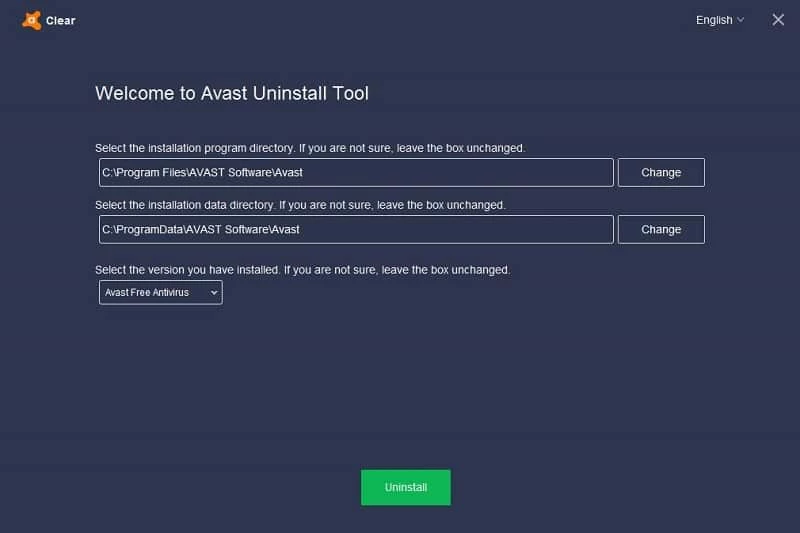

Avast Clear is a free, yet advanced antivirus removal software to offers robust protection against all types of threats, including internet threats. We can get rid of any type of insecure environment with the help of antivirus software, and Avast Free is one of the best solutions.
For some reason, we need to uninstall the program, which can be possible through the Add/Remove option. No doubt, the uninstallation of antivirus software becomes challenging, and the available default option can’t help us. The Avast Clear offers a quick uninstallation process for Avast products.
Avast Clear, developed by Avast Software, is commercial software that falls in the System Utility category. It is officially offered by Avast software that you can use for uninstalling all residual files from its products. It is a free and lightweight utility.
The Windows operating system offers an Add/Remove option in the control panel to remove any utility, but in case of uninstalling an antivirus or antispyware program, it started to give error messages such as setup is already running, so use Avast Clear to remove such programs easily.
The app, with a straightforward installation process, can easily be installed on your system. After installation, launch the program and navigate to the main screen. The interface includes an exclusive window with quick navigation to the antivirus location. Left the box unchanged if you couldn’t find the exact location. The list of all Avast products is arranged reliably, as it starts from the Free antivirus to Premium and Business Security. A prompt will appear to confirm the removal of products.
The tool requires Windows Safe Mode to continue the removal process. In this way, you can reduce the risk of any error because of your incorrect intervention. You can use the normal mode, but it is better to operate the process as the developer instructs. It will save you from encountering any problems while uninstalling the Avast products.
Uninstalling Avast products from the devices becomes impossible because of multiple reasons, such as conflict with other programs, missing or damaged files, corrupted installation files, virus or malware infections, or insufficient user permissions. So, you can use the innovative Avast Clear tool to bypass such reasons and remove entire residual files.
The tool helps to enhance performance while optimizing the existing space, as it identifies the fragmented files and other hindrances. The tool allows users to remove all identified items. It also enables you to detect the browser’s dangerous add-ons and install the safe variants after removing the dangerous add-ons. In addition, you can clear space on your hard drive while detecting as well as deleting the junk material.
It enables users to manage the challenge of removing the Avast products from their device, as it enables them to remove any product of Avast, including Avast Antivirus, Avast Business Security, Avast Pro Antivirus, Avast Omni, Avast Internet Security, Avast Small Office Protection, Avast Premium Security, Avast One, and Avast One Essential.
The tool is a premium program and offers a lot of advanced features to clear your system of Avast products. It helps to avoid the frustration of not removing the Avast products and facing multiple error messages, such as “setup is already running”; instead, install the innovative utility, and clear all residual files to install a better alternative. However, you can avail the free trial version for 14 days to check if you are satisfied with the performance, and simply purchase the subscription plan.
Pros
Con

Smadav Antivirus for the solid protection of your System. It is used for extra protection for USB, and Memory card

Avast Antivirus is the best antivirus program to save your system from virus, and any type of threat

Norton Antivirus multi-layered protection technology that can protect, detect, and remove all types of viruses from your system

AVG Antivirus is a powerful anti-virus program to ensure your online safety and security.

RKill is a lightweight app for scanning malware and enables the standard antivirus suit for cleaning the computer.

Trellix Stinger is a powerful platform with rootkit scanning that detects malware through next-generation scan technology.